
Core Styling Mechanics
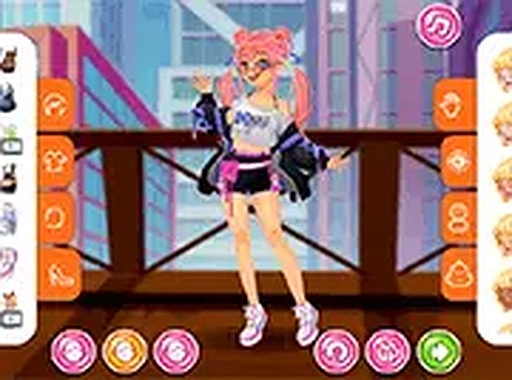
Urban Style Studio: Techwear Edition puts you in charge of assembling complete looks from a varied wardrobe. You start by selecting one of three models, each with a distinct base appearance. From there, you browse through categories such as tops, bottoms, outerwear, footwear, and accessories. Each piece you pick appears instantly on the model, letting you see how the combination works together. The interface is clean and responsive, making it easy to swap items until the outfit feels right. There are no points or timers, so you can experiment freely without pressure.
Creative Customization Options
Beyond simply choosing clothes, the game offers ways to adjust colors and small style details. This lets you fine-tune a look, making sure the shades of a jacket match the trousers or that a particular accessory stands out. The range of options encourages you to try pairings you might not have considered at first. Layering is a key part of the experience, as you can place jackets over tops or add scarves and bags to complete a street-ready appearance. The result is a creative sandbox where personal taste drives every decision.
Visual Style and Atmosphere
The game embraces a modern, minimal aesthetic that fits the techwear theme. Colors lean toward neutral tones like black, gray, and olive, with occasional bright accents for contrast. The models are drawn in a clean, stylized way that keeps the focus on the clothing. The background is simple and unobtrusive, ensuring your creations take center stage. This visual approach makes the game feel polished without being distracting, letting you concentrate on the styling process.
Accessibility and Platform Support
Urban Style Studio: Techwear Edition runs entirely in a web browser, so there is nothing to download or install. It works on both desktop computers and mobile devices, with touch controls that respond well on phones and tablets. A full-screen mode is available for a more focused view. The game loads quickly and performs smoothly even on older hardware, making it accessible to a wide range of players. This ease of access means you can start styling within seconds, whether you are at home or on the go.
Sharing and Saving Designs
Once you finish an outfit, the game lets you save it for later viewing or further editing. You can also share your favorite looks with friends or on social platforms. This feature adds a social dimension, allowing you to show off your creativity and get inspiration from others. The save function is straightforward, so you can build a personal gallery of designs over time. Whether you prefer to keep your work private or share it widely, the tools are there to support your choice.







Comments
0 comments