Corner Control Racing Challenge

Driving Racing Arcade
Corner Control Racing Challenge
181
Developer: Yard Shift Studio
Published: 2025-02-15
Updated: 2026-07-30

Reviews

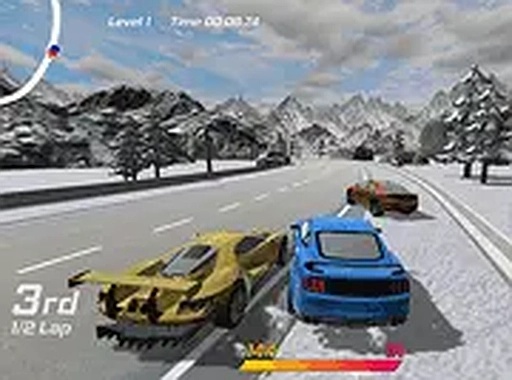
Corner Control Racing Challenge strips away unnecessary elements to concentrate on what matters: maintaining speed through turns. The vehicle selection offers meaningful choices thanks to distinct stat profiles, and the paint shop provides a simple customization outlet. Each track requires dedicated practice to learn the ideal racing line, and the satisfaction of shaving off a tenth of a second keeps you coming back. It is a lean, honest arcade racer that respects the player's time.

Description

Vehicle Selection & Stats

Before hitting the track, players review a lineup of cars, each with its own balance of acceleration, stopping power, and boost capacity. These attributes directly influence how a vehicle responds to steering inputs and how effectively it can carry speed through corners. Choosing the right car for a given track layout becomes part of the strategic decision-making process, as a nimble car might excel on tight circuits while a heavier model could offer more stability on long sweeping bends.

Paint Shop Customization

An in-game shop allows players to change the color of their chosen vehicle. This feature adds a layer of personal expression without affecting performance. Selecting a new paint scheme is straightforward, letting drivers quickly refresh the look of their car between races. The customization option provides a small but satisfying way to make the experience feel more personal.

Track Navigation & Drift Technique

The core gameplay revolves around negotiating curves without losing momentum. Players must learn the optimal racing line, braking points, and when to apply throttle to initiate a controlled slide. Successfully holding a drift through a turn can shave seconds off a lap time, making practice on each circuit essential. The game rewards smooth inputs and careful planning over aggressive driving.

Full Screen Mode & Controls

Keyboard and mouse inputs are used to control the car, with clear mappings for acceleration, braking, and steering. Enabling full screen mode expands the view, which can help drivers spot upcoming corners earlier and react more precisely. The browser-based nature means no downloads are required, and the experience remains responsive on desktop systems.

Practice & Progression

There is no set campaign or story mode. Instead, improvement comes from repeated attempts on each track. Drivers who invest time in learning the nuances of each course will see their lap times drop as they refine their technique. The absence of a rigid progression system means players can focus entirely on mastering the drift mechanics at their own pace.


Compatibility

Play on Any Device | Chrome / Safari / Edge Recommended

Faq

Can I play Corner Control Racing Challenge on a mobile phone?
The game is designed for desktop browsers and uses keyboard and mouse controls. It may not function properly on mobile devices or tablets due to the input requirements. Playing on a laptop or desktop computer is recommended for the best experience.
Are there multiple tracks to choose from?
Yes, the game includes several distinct tracks, each with its own layout and corner configurations. Players can select which track to practice on, allowing them to focus on specific types of turns and improve their drifting technique in different environments.
Does the paint color affect car performance?
No, changing the paint color is purely cosmetic. It does not alter any vehicle statistics such as speed, braking, or nitro. The customization option exists solely to let players personalize the appearance of their car without impacting gameplay balance.
How do I unlock new cars?
The input does not specify a car unlock system. It is possible that all vehicles are available from the start, or that new cars become accessible after meeting certain lap time targets. Check the in-game menu for any progression indicators.
Is there a multiplayer mode?
The available information does not mention multiplayer or online races. Corner Control Racing Challenge appears to be a single-player experience focused on individual lap time improvement. Players compete against their own best records rather than against others in real time.
What should I do if the game runs slowly?
Since the game runs in a browser, performance can depend on your computer's specifications and other open programs. Closing unnecessary tabs, updating your browser, and ensuring your graphics drivers are current may help. Lowering the browser's resolution could also improve frame rates.

Comments

0 comments
U
User
Loading comments...