
Control System
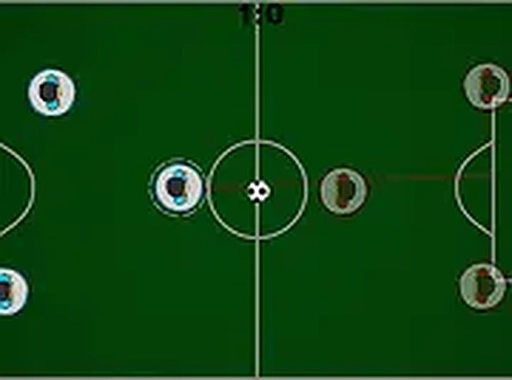
Field Goal Soccer Quick Match uses a straightforward push-and-pull mechanic. Players move their on-screen character by clicking or tapping, then push the ball toward the opponent's goal. Pulling back helps defend your own net. This design makes the game easy to learn for new players while still allowing experienced players to develop timing and positioning strategies.
Match Modes
The game includes two primary ways to play. In solo mode, you face a computer-controlled opponent that provides a consistent challenge. For those who prefer human competition, local two-player mode lets two people share the same screen, each controlling their own player. Matches continue until one side reaches the target score.
Accessibility and Setup
Field Goal Soccer Quick Match runs entirely in a web browser. There is no software to install or account to create. Players can start a match within seconds of opening the page. Full screen mode is available for those who want a larger view of the field. The game works on various devices with a mouse or touch screen.
Skill Development
Success in Field Goal Soccer Quick Match depends on reading the ball's movement and anticipating the opponent's actions. Players learn to time their pushes and pulls to create scoring opportunities while preventing goals. Regular play helps improve reaction speed and decision-making under pressure. The simple controls allow players to focus on strategy rather than complex button combinations.
Visual and Audio Presentation
The game presents a clean, clear view of the soccer field with distinct player markers and a visible ball. The interface remains uncluttered so players can concentrate on the action. Sound effects provide feedback for goals and other key moments without being distracting. The overall presentation supports the fast-paced nature of each match.






Comments
0 comments